#1 Best Volume Profile for Ninjatrader

Indicator #1 Best Volume Profile for Ninjatrader

1768198348656.png


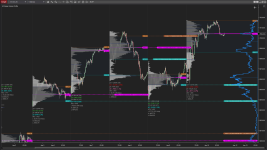
DT Range Volume Profile (RVP) – Overview​


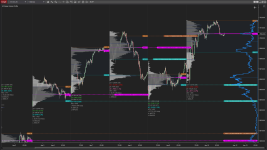
The Range Volume Profile (RVP) is a multi-mode volume profiling and VWAP tool for NinjaTrader that allows traders to analyze volume distribution and fair value across sessions, composite ranges, or manually selected price/time windows. It is designed for contextual market structure and order-flow-aware discretionary trading, not automated signals.


Key Modes and Features​

1. Session Volume Profile​

  • Automatically plots a volume profile for each trading session (e.g., RTH or ETH).
  • Integrated Advanced VWAP
  • Resets at session boundaries.
  • Displays:
    • Point of Control (POC)
    • Value Area High (VAH)
    • Value Area Low (VAL)
  • Commonly used to:
    • Identify prior session acceptance
    • Trade rotations within balance
    • Reference prior session POC as support/resistance

2. Composite Volume Profile​

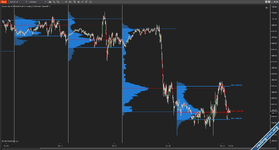
  • Builds a single volume profile across multiple sessions.
  • The trader defines how many sessions are included in the composite.
  • Used to identify:
    • Higher-timeframe balance
    • Longer-term acceptance zones
    • Major HVNs and LVNs that persist across days
  • Particularly useful for:
    • Swing context
    • Week-to-date or month-to-date analysis

Custom Select Profile​

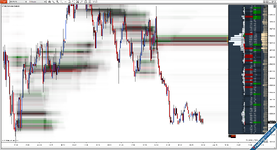
  • Allows the trader to manually select a start and end point directly on the chart.
  • Can be anchored to:
    • A specific impulse move
    • Consolidation range
    • News event
    • Any discretionary price window
  • This mode is the most flexible and is often used for:
    • Auction theory analysis
    • Mapping initiative vs responsive behavior
    • Planning trades around LVN breaks or HVN rotations

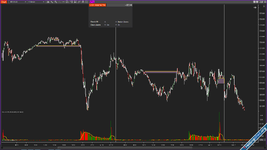
The additional RVP features, such as metrics and quick options, are designed to improve speed, clarity, and usability during live trading. The metrics provide a compact, on-chart summary of key profile statistics—such as value area, POC, VWAP, and range characteristics—so the trader can immediately understand market context without manual analysis. Quick options allow fast, in-chart adjustments to profile modes, visibility, and key parameters, enabling the trader to adapt the analysis in real time without interrupting workflow or navigating indicator settings.


-and it is my personal favorite.
 

Attachments

Last edited:
¡Buenos días !

mil navegador Chrome me bloquea la descarga del parche de reinicio, lo detecta como posible virus o fuente desconocida. Lo he intentado descargar en modo incógnito y tampoco ha funcionado. Puedes enviarlo en formato ZIP .

Muchas gracias!
 
any idea what to do when you can your browser does not let you download the reset patch?
 
¡Buenos días !

mil navegador Chrome me bloquea la descarga del parche de reinicio, lo detecta como posible virus o fuente desconocida. Lo he intentado descargar en modo incógnito y tampoco ha funcionado. Puedes enviarlo en formato ZIP .

Muchas gracias!
¡Cómo estás esta en zip, trata de conectarte en Microsoft Edge, o debes tener algo que bloquee el pop up! Saludos
 
1768198348656.png


DT Range Volume Profile (RVP) – Overview​


The Range Volume Profile (RVP) is a multi-mode volume profiling and VWAP tool for NinjaTrader that allows traders to analyze volume distribution and fair value across sessions, composite ranges, or manually selected price/time windows. It is designed for contextual market structure and order-flow-aware discretionary trading, not automated signals.


Key Modes and Features​

1. Session Volume Profile​

  • Automatically plots a volume profile for each trading session (e.g., RTH or ETH).
  • Integrated Advanced VWAP
  • Resets at session boundaries.
  • Displays:
    • Point of Control (POC)
    • Value Area High (VAH)
    • Value Area Low (VAL)
  • Commonly used to:
    • Identify prior session acceptance
    • Trade rotations within balance
    • Reference prior session POC as support/resistance

2. Composite Volume Profile​

  • Builds a single volume profile across multiple sessions.
  • The trader defines how many sessions are included in the composite.
  • Used to identify:
    • Higher-timeframe balance
    • Longer-term acceptance zones
    • Major HVNs and LVNs that persist across days
  • Particularly useful for:
    • Swing context
    • Week-to-date or month-to-date analysis

Custom Select Profile​

  • Allows the trader to manually select a start and end point directly on the chart.
  • Can be anchored to:
    • A specific impulse move
    • Consolidation range
    • News event
    • Any discretionary price window
  • This mode is the most flexible and is often used for:
    • Auction theory analysis
    • Mapping initiative vs responsive behavior
    • Planning trades around LVN breaks or HVN rotations

The additional RVP features, such as metrics and quick options, are designed to improve speed, clarity, and usability during live trading. The metrics provide a compact, on-chart summary of key profile statistics—such as value area, POC, VWAP, and range characteristics—so the trader can immediately understand market context without manual analysis. Quick options allow fast, in-chart adjustments to profile modes, visibility, and key parameters, enabling the trader to adapt the analysis in real time without interrupting workflow or navigating indicator settings.


-and it is my personal favorite.
great
 
Buenas gente, me dejó de funcionar el perfil de volumen, veo que el archivo del parche ya no está, ¿pueden compartirlo? gracias!
 
Similar content Most view View more
Back
Top Bottom