Net % Change Chart Plot

Indicator Net % Change Chart Plot

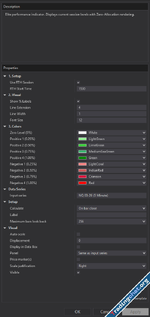
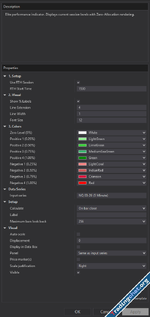
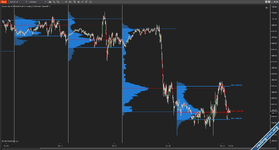
This is an indicator I made with AI, the first indicator I made. It's simple: just plot the net % change on the price; you can use it for ETH or RTH.
I use Gemini 3 Pro for coding, so you can use it with Gemini if you want to change something. For this simple code, Gemini 3 works great for me.

You just need to paste the .cs file on C:\Users\Admin\Documents\NinjaTrader 8\bin\Custom\Indicators
1771052194655.png
1771052181685.png
 

Attachments

Last edited:
This is an indicator I made with AI, the first indicator I made. It's simple: just plot the net % change on the price; you can use it for ETH or RTH.
I use Gemini 3 Pro for coding, so you can use it with Gemini if you want to change something. For this simple code, Gemini 3 works great for me.

You just need to paste the .cs file on C:\Users\Admin\Documents\NinjaTrader 8\bin\Custom\Indicators
1771052194655.png1771052181685.png
looks cool, is this a fib extension tool? Could you provide more detail on how to use it?
 
looks cool, is this a fib extension tool? Could you provide more detail on how to use it?
It's not a Fibonacci tool; it's just a net % change of price. Now, in the image, it's 0% because it's the weekend, but the indicator that AI built it is just this but plotted on the chart with some horizontal lines.

1771053474247.png

1771053683316.png
 
This is an indicator I made with AI, the first indicator I made. It's simple: just plot the net % change on the price; you can use it for ETH or RTH.
I use Gemini 3 Pro for coding, so you can use it with Gemini if you want to change something. For this simple code, Gemini 3 works great for me.

You just need to paste the .cs file on C:\Users\Admin\Documents\NinjaTrader 8\bin\Custom\Indicators
1771052194655.png1771052181685.png

Where is the indicator?
 
This is an indicator I made with AI, the first indicator I made. It's simple: just plot the net % change on the price; you can use it for ETH or RTH.
I use Gemini 3 Pro for coding, so you can use it with Gemini if you want to change something. For this simple code, Gemini 3 works great for me.

You just need to paste the .cs file on C:\Users\Admin\Documents\NinjaTrader 8\bin\Custom\Indicators
1771052194655.png1771052181685.png
@Bladeby - Thanks for your contributions. Being as you've been so open about creating these indicators with AI, could I ask you to share your process? Which AI models and the methodology of approach, that kind of thing. I'm not asking for a step-by-step guide (unless you want to give that :-) ). I'm just trying to get an idea whether it might be something I should look into myself. If not - no problem. Thanks in advance.
 
@Bladeby - Thanks for your contributions. Being as you've been so open about creating these indicators with AI, could I ask you to share your process? Which AI models and the methodology of approach, that kind of thing. I'm not asking for a step-by-step guide (unless you want to give that :-) ). I'm just trying to get an idea whether it might be something I should look into myself. If not - no problem. Thanks in advance.
To be completely honest with you, I'm not actually a programmer! I love technology, but learning to code from scratch takes a ton of time that I just didn't have.

However, with the latest AI models out there right now like Claude 4.6, GPT 5.3 Codex, and Gemini 3.1 Pro you can build incredibly complex stuff just by chatting with them.

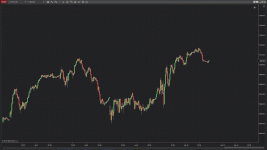
Here is how my process usually works:If you don't know how to code, it will take some trial and error at first. It's all about your 'prompting' meaning how clearly you explain your idea to the AI. A really cool trick I use is taking a screenshot of an indicator I found online, uploading it to the AI, explaining what it does, and asking it to recreate a custom version for my specific needs. The AI handles the rest!

Right now, I'm mostly using GPT 5.3 Codex inside Visual Studio, and I also use Gemini 3.1 Pro on the side. Using Visual Studio might look scary at first glance, but for NinjaTrader 8 indicators, it's actually pretty simple once you get the hang of it.

My best advice if you want to look into this: just think of an indicator you'd love to have and try it! Start with something relatively small (maybe around 2,000 lines of code) so you don't get overwhelmed. Once you learn how to guide the AI, you can easily scale up to massive projects of 20K or even 50K lines, and the AI will write it all without breaking NT8. It just takes patience and dedication!
 
To be completely honest with you, I'm not actually a programmer! I love technology, but learning to code from scratch takes a ton of time that I just didn't have.

However, with the latest AI models out there right now like Claude 4.6, GPT 5.3 Codex, and Gemini 3.1 Pro you can build incredibly complex stuff just by chatting with them.

Here is how my process usually works:If you don't know how to code, it will take some trial and error at first. It's all about your 'prompting' meaning how clearly you explain your idea to the AI. A really cool trick I use is taking a screenshot of an indicator I found online, uploading it to the AI, explaining what it does, and asking it to recreate a custom version for my specific needs. The AI handles the rest!

Right now, I'm mostly using GPT 5.3 Codex inside Visual Studio, and I also use Gemini 3.1 Pro on the side. Using Visual Studio might look scary at first glance, but for NinjaTrader 8 indicators, it's actually pretty simple once you get the hang of it.

My best advice if you want to look into this: just think of an indicator you'd love to have and try it! Start with something relatively small (maybe around 2,000 lines of code) so you don't get overwhelmed. Once you learn how to guide the AI, you can easily scale up to massive projects of 20K or even 50K lines, and the AI will write it all without breaking NT8. It just takes patience and dedication!
Excellent. Thanks for your insights.
 
Similar content Most view View more
Back
Top Bottom