- Views: 506
- Replies: 5
Quick Overview
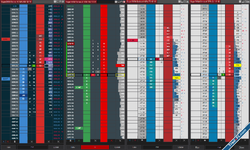
Unleash the power of nine highly customizable and dynamic columns for your NinjaTrader® SuperDOM! Construct the ultimate SuperDOM, meticulously crafted to cater to your every trading need. Experience cutting-edge trading capabilities melded with unmatched performance, encapsulating all the premium features you’ve ever desired in a professional set of DOM columns.
| Feature / Tool | Purpose / Benefit |
|---|---|
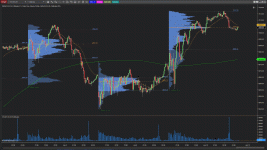
| Volume Pro | display high low volume nodes, value areas, and volume deltas either Diagonal Deltas or Linear Deltas. Additionally, you can display different volume profiles of different time frames. |
| Depth | Place trades quickly and intuitively. View depth imbalances and well find large limit orders. View adds and pulls from the orderbook with the Updates mode. Analyze OrderBook imbalances and quickly get summary statistics about the orderbook. Integrated with NinjaTrader’s Advanced Trade Management (ATM) |
| Trades | determine price levels that are battled over and attract more market participants. |
| Time and Sales | analyze the prints and OrderFlow also with tick direction to easily see the flow. |
| Orders | a dedicated column for your order management. Modify quantity, move and cancel your orders. Integrated with NinjaTrader’s Advanced Trade Management (ATM) |
| SuperDOM Utilities | further customize your SuperDOM by removing certain controls. |
| Notes Pro | Keep your notes safe, and your trading insights preserved. |
How to Install?
1. Close ninjatrader2. Install Superdom setup first
3. Paste the dll into documents/ninjatrader/bin/custom how to paste?
done!
How to Apply?
Attachments
Last edited:

