
- Joined
- Jan 8, 2026
- Messages
- 370
 Trading Calendar Pro for NinjaTrader 8
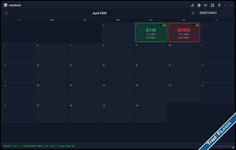
Track P&L, Journal Trades, and Master Your Performance — All in One Beautiful Interface Key Features
| Feature | What It Does | |
|---|---|---|
 | Auto P&L Sync | Automatically pulls Realized P&L from all connected accounts every 3 seconds. No manual entry — just trade, and the calendar updates itself |
 | Daily Trade Stats | Tracks Trades, Wins, Losses, Win Rate %, Profit Factor, Gross Profit/Loss, Largest Win/Loss. Know exactly how you performed each day |
 | Trading Journal | Write daily entries — Mood, Lessons Learned, Mistakes, and a 1–5 Rating. Build discipline and learn from every session Rating. Build discipline and learn from every session |
 | Dark / Light Theme | One-click th eme toggle — easy on the eyes for day or night trading. Switch instantly with  / / button button |
 | Auto-Backup | Hourly + Daily backups (pre-close, EOD, extended hours). Never lose your trading data |
 | Sync Log Viewer | Real-time log of all sync events, errors, and updates. Debug and monitor what the engine is doing |
 | Persistent Window State | Remembers window size, position, and last selected account. Your layout stays exactly how you like it |
 | Multi-Account Support | Toggle between Sim, Live, and multiple brokerage accounts. Track each account separately or view aggregated totals |
 | Monthly Summary | Auto-calculates: Net P&L, Total Trades, Win Rate %, Profit Factor, Winning Days vs Losing Days. See the big picture without spreadsheets |
 Why Every Trader Needs This
| Problem | Solution (This Calendar) |
|---|---|
 "I don't know my daily P&L without exporting from NT8" "I don't know my daily P&L without exporting from NT8" |  Live auto-sync — P&L updates every 3 seconds, no exports needed Live auto-sync — P&L updates every 3 seconds, no exports needed |
| "I forget what I was thinking during a trade" | Journal + Mood + Rating — capture your mental state before you forget |
| "My win rate looks fine but I'm not profitable" | Profit Factor & Net P&L — see the real effectiveness of your strategy |
| "I revenge trade but don't track it" | Mistakes & Lessons fields — force accountability |
| "I have multiple accounts — tracking is a mess" | Per-account or aggregated view — see everything in one place |
| "I lost my trade data when NT8 crashed" | Auto-backup every hour + daily — your data is safe |
| "I don't know if I'm improving month to month" | Color-coded calendar cells — green = profit day, red = loss day, at a glance |
 Installation Instructions
In NinjaTrader 8, go to Tools → Import → NinjaScript Add-On...- Open Control Center → Tools → Trading Calendar
- Select your account from the dropdown — done!

Happy Trading!